All about Form GST-PMT-09

Many times mistakes or errors occur by the taxpayers while preparing the GST challan. Sometimes, taxpayers pay the amount under the wrong head, and it cannot be used to discharge the liability that may be due under another head. In such cases, the taxpayer has to claim a refund. The process of filing the refund claim and its disbursement may lead to blockage of funds for the taxpayers. Here, the Form GST-PMT-09 becomes useful and is one of the 3 GST Functionalities Deployed Today by GSTN to simplify tax operations.
Form GST PMT-09 enables any registered taxpayer to perform intra-head or inter-head transfer of amount as available in Electronic Cash Ledger. Thus, a registered taxpayer can now file Form GST PMT-09 for transfer of any amount of tax, interest, penalty, fee or others, under one (major or minor) head to another (major or minor) head, as available in the Electronic Cash Ledger.
KEY POINTS:
- If wrong tax has already been utilized for making any payment, then form PMT-09 is not useful.
- Only the amount that is available in E-cash ledger can only be reallocated. The amount once utilized and removed from the cash ledger cannot be reallocated.
To file Form GST PMT-09, perform following steps:
- Login to the GST Portal with valid credentials.
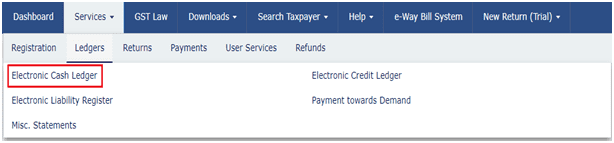
- Navigate to Services> Ledgers> Electronic Cash Ledger option.
- Click File GST PMT-09 For Transfer of Amount option to perform intra-head or inter-head
transfer of amount.
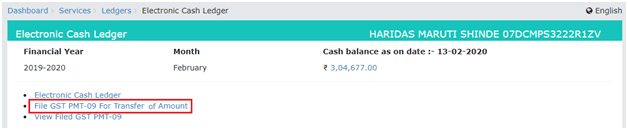
- Electronic Cash Ledger page is displayed.
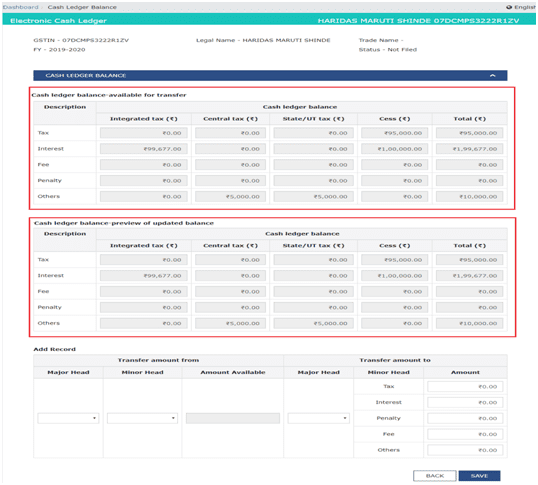
- Under CASH LEDGER BALANCE, Electronic Cash Ledger balance which is available for transfer is displayed.
- Under CASH LEDGER BALANCE, preview of updated Electronic Cash Ledger balance i.e. the resultant figures which will remain in various heads, after transfer of amount is effected by GST Portal on filing of Form GST 09, is displayed.
- Under the ADD RECORD, Enter the details in transfer amount from and transfer amount to and click SAVE to continue.
After entering the details in the add record and clicking on Save tab, amount will get updated in Cash Ledger balance-preview of updated balance.
- Click YES to proceed the transfer of amount.
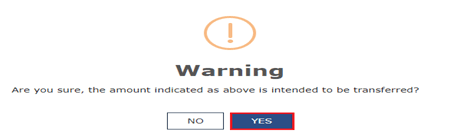
- When we saved the details, the entered details will get reflected with processed records.
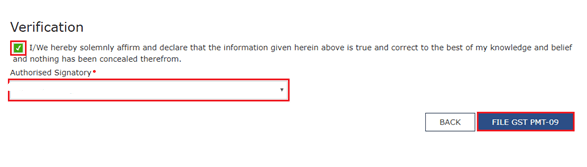
Click PROCEED TO FILE. Select the Verification checkbox and select the Authorised Signatory.
Click FILE GST PMT-09.
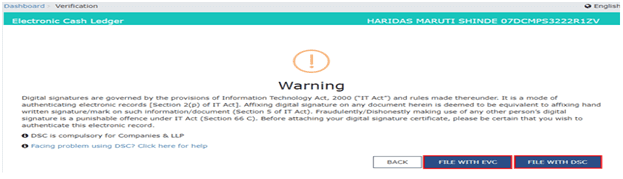
- Click the FILE WITH DSC or FILE WITH EVC button.
- Click PROCEED. A confirmation message is displayed that the filing has been successful and ARN is displayed on the screen. ARN will also be sent to the registered e-mail address and mobile number.


Reliable
Businesses rely on us due to our Strong commitment to customer satisfaction.
Disclaimer:The information provided on this website is intended for general information purposes only. Although all reasonable efforts are made to ensure that the information provided is correct and reliable, it is not advised to be used as a substitute for professional advice. The information herein is not to be used in place of seeking professional services, counsel, or guidance. We highly advise that you consult a professional before you make any business or legal decisions regarding the information presented on this website. This website and its contents are given "as is", and we do not take any responsibility for any action that is taken based on information given on this website.

- Written by: Abhishek Yadav
- Fact-checked: Sahil Singh
- Updated on: March 31, 2026