
How to view filed TDS statement on income tax department website
Employers and organisations that deduct tax at source can check the TDS statement after filing the statement, just to make sure everything is correct. Here is the step-by-step procedure to do it.
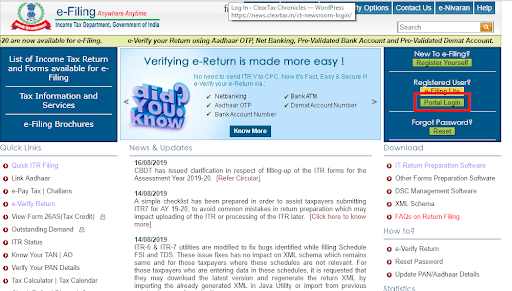
Step 1: Visit the income tax e-filing portal at the URL
https://www.incometax.gov.in/iec/foportal/
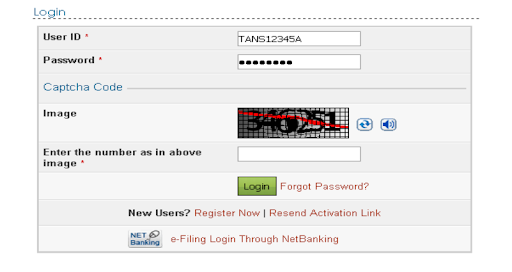
Step 2: Log in to the e-filing portal with your log in credentials.
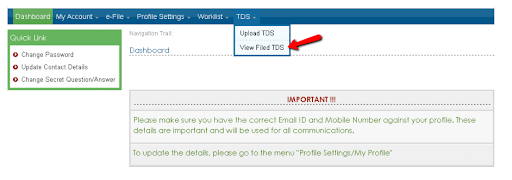
Step 3: Select the ‘View Filed TDS’ option under the ‘TDS’ tab.
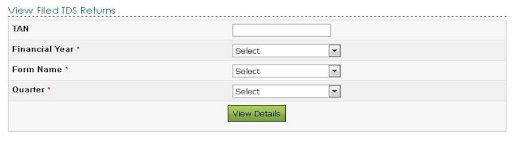
Step 4: Select the financial year, form name, and quarter, from the dropdown menu for which the TDS statement was uploaded. Click on the ‘View Details’ button.
Step 5: The details of the TDS statement will be displayed. Once you upload the TDS statement, the ‘Status’ column will be shown as ‘Uploaded’. Upon validation, the status will either be ‘Accepted’ or ‘Rejected’.
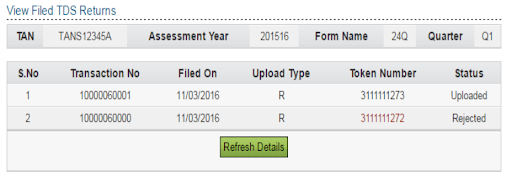
The final judgement will be reflected on the portal within a period of 24 hours from the time of upload.
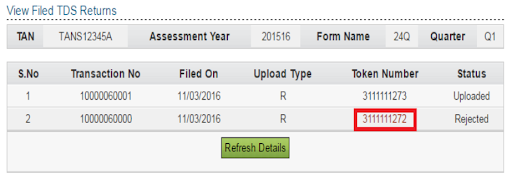
Step 6: If the statement is rejected, it will state the reasons for rejecting it. Click on the token number to view the rejection reasons.
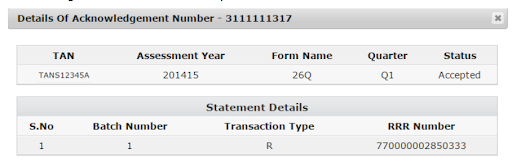
Step 7: If the status is ‘Accepted’, click on the token number to view the acknowledgement details of the uploaded TDS statement.


Reliable
Businesses rely on us due to our Strong commitment to customer satisfaction.