How to add Challan on TRACES Website
The Income Tax Department has discontinued the C9 correction option that was previously used to add new challans or transfer vouchers in correction statements. This option has been removed in the RPU 4.8.
The online correction facility can be used on statements from FY 2007-08 onwards. This online correction can be done free-of-cost on TRACES. Online correction is that it can be done without requesting a Conso file. You have to just login and file the correction, which gets processed in just 24 hours.
Follow this step-by-step process to add a challan or transfer voucher via the correction statement on the TRACES website:
Step 1:
Login to TRACES website
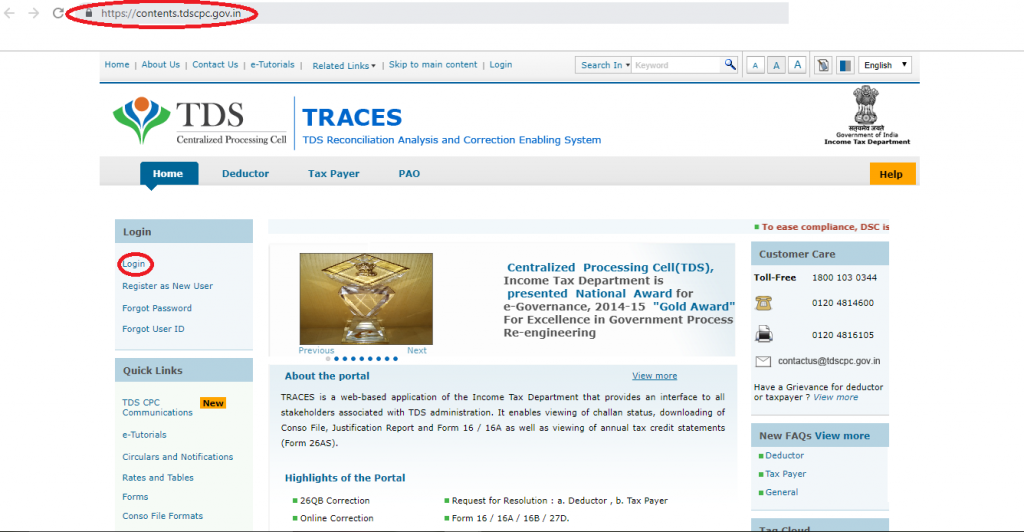
Step 2:
Go to the ‘Request for correction’ tab under ‘Defaults’. The correction category should be ‘Online’

A request number will be generated.
Step 3:
Click on ‘Track Correction Request’ under ‘Defaults’.
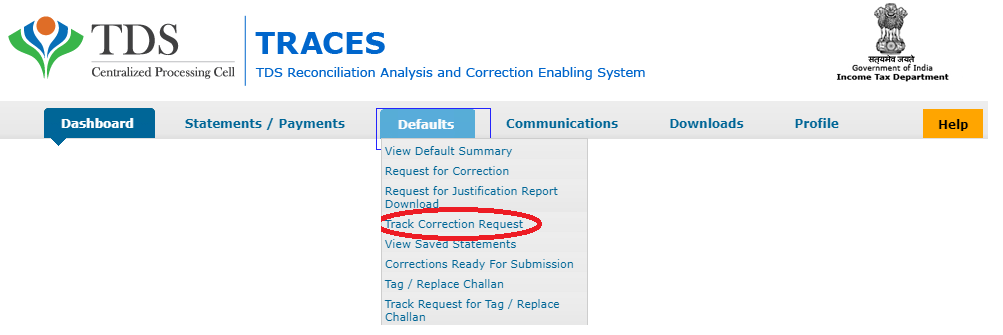
Click on the Available/In progress status to proceed with the correction.
- KYC validation is needed.
- Make sure you have the latest acknowledgement number. When you get a verification form, you will have to fill the original acknowledgement number in this verification form.
Step 4:
From the drop-down menu, select ‘Add challan’ in the type of correction category.
Step 5:
Make the required corrections and click on ‘Submit for Processing’. A 15-digit token number will be generated and sent to your registered email ID. the correction will be processed in 24 hours.
Once the correction has been processed, you will be able to download the consolidated file. The new challan will be displayed in the downloaded consolidated file.


Reliable
Businesses rely on us due to our Strong commitment to customer satisfaction.