AD Code Registration Online On ICEGATE
Get AD Code Registration on ICEGATE Portal @₹2,999!

4.9


AD Code Registration Online On ICEGATE Portal - Process & Fees
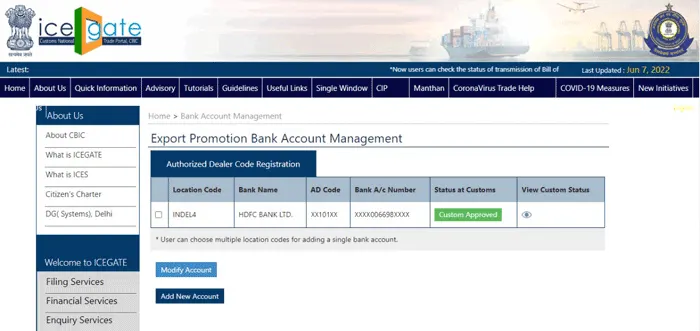
AD code is an authorized dealer code issued by the account holder bank branch, which has to be linked online on the ICEGATE portal with the help of a class 3 digital signature certificate. IEC Code & AD Code Registration on the ICEGATE portal is important so that the custom authority can check the shipping documents & approve it for export.
Once the AD code has been approved on the ICEGATE portal, necessary documents have to be uploaded & a URT number is being generated for reference. Specific port has to be linked on the ICEGATE portal from which the export or import of goods will be taking place.
AD Code Certificate [Sample]
AD Code Registration Process for ICEGATE
Follow these steps to complete your AD Code registration on ICEGATE easily.
- Documentation
- Application to ICEGATE Portal using Organization based Class 3 DSC
- Regular follow up with the concerned Port for processing of AD Code registration.
- Approval of AD Code from Customs


Documents Required for AD Code Registration for ICEGATE
These documents are required to verify your AD Code for ICEGATE registration.

- AD Code letter on banker’s letterhead
- GST Registration Certificate
- Import Export Code
- PAN Card
- Copy of Canceled Cheque
- Request Letter or Authorisation letter for AD Code on the letterhead
- PAN, Aadhaar Card and Voter ID/Passport of the owners/Partner/Director’s
- MOA, AOA & COI in case of Company
- Partnership Deed in case of Partnership Firm
Our Team of Professionals can help you in getting the documents prepared for your application.
AD Code Registration Fees for ICEGATE
Here is the overview of the fee structure for AD Code Registration on the ICEGATE portal:
Application Fee for AD Code registration on ICEGATE is Rs. 2,999/- (a one-time fee paid by the exporter). There is no government fee for registering the AD Code on the ICEGATE portal.
Note: The aforementioned Fees is exclusive of GST.
What is the AD Code Registration on the ICEGATE Portal?
In order to facilitate seamless customs clearance and obtain export benefits, exporters in India must register their AD Code on the ICEGATE portal. The exporter's bank issues the 14-digit Authorized Dealer (AD) Code, which needs to be registered with Indian Customs via the ICEGATE portal. This code enables smooth foreign exchange transactions and the creation of shipping bills by connecting the exporter's bank account with their Import Export Code (IEC). The ICEGATE AD Code Registration Process is an essential step in ensuring accurate documentation and compliance.
Exporters are unable to submit shipping bills or apply for government incentives such as duty drawbacks and GST refunds if they do not have an AD Code. The registration process is now quick, paperless, and easy to use thanks to the ICEGATE portal. Documents such as the bank's AD Code letter, GST certificate, IEC copy, and other fundamental information must be submitted by exporters.
Following approval, the AD Code is connected to the chosen port, guaranteeing expedited export paperwork and easier adherence to customs laws.
AD Code Registration Timeline & Validity on ICEGATE Portal
The AD Code is usually registered on the ICEGATE website within 2 to 3 business days. This quick process lets exporters create shipping bills and get customs approval without any delays. The AD Code never expires and acts as a lasting identifier for all your export activities. If there are any changes, like a new bank, AD branch, or shipping port, you need to update the AD Code on ICEGATE with the new details.
Keeping the AD Code registered and up to date makes exporting easier, speeds up customs clearance, and helps follow RBI and FEMA rules. This creates a reliable and smooth setup for doing business internationally
AD Code Port Registration on ICEGATE
AD code registration can be done online on the ICEGATE portal for each port separately. It is mandatory to register AD code on the port where you intend to import goods. The 13 major ports in India are listed below.
| Port Location | ICEGATE AD code Registration | Port Code |
|---|---|---|
| Mumbai | Nhava Sheva Port registration | INNSA1 |
| Tamil Nadu | Ennore Port Registration | INENR1 |
| Gujarat | Kandla Port Registration | INIXY6 |
| Chennai | Chennai Port Registration | INMAA6 |
| West Bengal | Kolkata Port Registration | INCCU1 |
| Karnataka | New Mangalore Port Registration | INNML1 |
| Kerala | Cochin Port Registration | INCOK4 |
| Orissa | Tuticorin Port Registration | INPRT1 |
| Maharashtra | Mumbai Port Registration | INBOM6 |
| Andhra Pradesh | Visakhapatnam Port Registration | INVTZ6 |
| Tamil Nadu | Tuticorin Port Registration | INTUT1 |
| Andaman & Nicobar | Port Blair Port Registration | INIXZ1 |
| Goa | Mormugao Port registration | INMRM1 |
Ports / ICD for AD Code Registration
Conclusion
Every Indian exporter must get their AD Code Registration on ICEGATE Portal in order to receive significant export benefits and ensure simple customs clearance. Customs can quickly confirm your information when your Authorised Dealer Code is accurately connected to your IEC and port on ICEGATE. This simplifies the creation of shipping bills, processing, and complies with export laws. This straightforward but necessary step helps exporters maintain accuracy and transparency in their documentation and removes delays.
Professional Utilities can help you register in a timely, error-free, and professional manner. Our staff helps with portal filing, Class 3 DSC support, document preparation, and ongoing customs follow-up until approval. With our expert guidance, exporters can complete their AD Code Registration effortlessly and focus on growing their business with confidence.
FAQ’s On AD Code Registration Online On ICEGATE
What is AD Code registration on the ICEGATE portal?
Registering the AD Code on ICEGATE connects your bank's Authorized Dealer code with Customs, enabling exporters to submit shipping bills and clear their goods.
Why is AD Code required for exporting?
An AD Code is essential for obtaining export payments, issuing shipping bills, finalizing customs clearance, and claiming export incentives.
How do I register my AD Code on the ICEGATE portal?
You can register your AD Code by uploading your bank's AD Code letter, KYC documents, and IEC on the ICEGATE portal or via Cochin/Chennai/Delhi Customs.
What documents are needed for AD Code registration on ICEGATE?
You require the IEC, AD Code letter from your bank, GST certificate, PAN, and proof of address for your business premises.
How long does AD Code registration take on ICEGATE?
Approval usually requires 24 to 72 hours, depending on the workload at customs.
Is there any government fee for AD Code registration?
No, ICEGATE and Customs do not charge any government fee for AD Code registration.
Can I register multiple AD Codes on ICEGATE?
Certainly, exporters are allowed to register several AD Codes if they utilize various ports or different branches of banks.
Can I update or modify my AD Code on ICEGATE?
Yes. Any change in bank or branch requires updating AD Code details and re-uploading documents on ICEGATE.
Speak Directly to our Expert Today

Reliable

Affordable

Assured
Industries Served by
Professional Utilities

Apparels

Footwear

Furniture

Gems and Jewellery

Tourism & Hospitality

Consumer Electronics

Chemicals

Telecom

Oils & Gas

Hotel

Railways

Liquor

Health & Medical

Food Processing

Dangerous/ Haz. Goods

Tea & Coffee

Capital Goods

Recycling

Rubber

NGOs

Silk

Handloom

IT & BPM

Steel

Automobile

Tobacco

Constructions


Testimonials
"Explore how Professional Utilities have helped businesses reach new heights as their trusted partner."







It was a great experience working withProfessional Utilities. They have provided the smoothly. It shows the amount of confidence they are having in their field of work.

Atish Singh


It was professional and friendly experience quick response and remarkable assistance. I loved PU service for section 8 company registration for our Vidyadhare Foundation.

Ravi Kumar
I needed a material safety data sheet for my product and they got it delivered in just 3 days. I am very happy with their professional and timely service. Trust me you can count on them.

Ananya Sharma
Great & helpful support by everyone. I got response & support whenever I called to your system. Heartly thanx for Great & Super Service. Have a Great & Bright future of team & your company.

Prashant Agawekar
Thank you so much Professional Utilities team for their wonderful help. I really appreciate your efforts in getting start business. Pvt Ltd company registration was smooth yet quick.
Abhishek Kumar
I applied for Drug licence and company registration and their follow-up for work and regular updates helped me a lot. They are happily available for any kind of business consultancy.

Vidushi Saini
Great experience went to get my ITR done, process was quite convenient and fast. Had a few queries, am happy about the fact those people explained me all things I wanted to know.

Taniya Garyali
Great services provided by Professional Utilities. They are best in this industry and the best part is their prices are so affordable. Kudos to you. Now you guys are my full-time consultant.

Aftab Alam
Trusted By